Versioning
- Qt 5.12.8
- QtQuick 2.0
- QtQuick.Controls 2.5
User-Modifiable Button
I have a custom button for my application. It looks like this.
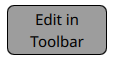
This button has a special feature: it allows the user to modify its text contents. The user can do this through changing the text through via a dialog, but that is outside of the scope of this write up.
I wanted to make a note here about how the text can be contained and fit inside of the button when the user puts a variable amount of custom text in.
Providing a Wrap Mode
I’ve found an large amount of posts online regarding how to make the text wrap inside of a QML shape. To do this, you can use the wrapMode field inside of Text. Here is the code for my button using the wrapMode.
Button {
  id: playerButton
  implicitWidth: 100
  implicitHeight: 50

  contentItem: Text {
      anchors.fill: parent
      text: title
      wrapMode: Text.Wrap
      font.pixelSize: 15
      horizontalAlignment: Text.AlignHCenter
      verticalAlignment: Text.AlignVCenter
  }
}
As you can see, we gave our Text a wrapMode of Text.Wrap. Since this item fills the interior of its parent, i.e. the Button, the text will break to a new line when its width matches that of the Button'. This restricts the text from passing the side boundaries of the Button`.
This is great, except the bounds are passed on the top and bottom when the text becomes too long like the example below.
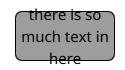
Not very pretty, is it?
A Viable Solution
I needed the text to dynamically shrink so it would remain bounded on all four sides of the button. The text needed to be contained within.
Surely someone had done this before. Alas, I could find no resources, so this solution came down to experimentation. Here’s what I found that works.
We can use the fontSizeMode of the Text and also set a minimumPixelSize like this:
Button {
  id: playerButton
  implicitWidth: 100
  implicitHeight: 50

  contentItem: Text {
      anchors.fill: parent
      text: title
      wrapMode: Text.Wrap
      fontSizeMode: Text.VerticalFit
      minimumPixelSize: 3
      font.pixelSize: 15
      horizontalAlignment: Text.AlignHCenter
      verticalAlignment: Text.AlignVCenter
  }
}
This works by shrinking the text down continuously in proportion to the amount of text so it remains bounded. Naturally, there is an end; this method stops working when the text reaches the size set in minimumPixelSize.
Take a look at the result.
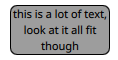
Luckily, the user would likely never input this much text, but the UI will not break if they do.
Summary
In QML, making the text inside of a button wrap vertically and horizontally utilizes both the wrapMode and fontSizeMode fields.
Maybe it is a hack, but it is a working and reliable one.